
Scroll down to see Step by Step procedure for Regisration.

Support email info@courtbookings.co.za & info@zambesitennis.co.za
Dear Members,
We are rolling out a new Court Booking System allowing Members to book Tennis Courts at Zambesi.
Registering is easy and can be done on Web or Mobile, simply follow the below instructions to get started.
1. Visit https://zambesi.courtbookings.co.za from your Web or Mobile browser
2. Click on Create one now and enter your First Name, Last Name, a valid Email Address and set a new Password
3. Click Register to submit the form for verification
4. Check your inbox for an email from no-reply@courtbookings.co.za with a Verify Email button
5. Click on the Verify Email button in the email to verify your email address
6. Upon verification, Zambesi Administration will be notified in order to set you up as a Member with booking permissions
7. Log in to the Court Booking System at any time using the same link (https://zambesi.courtbookings.co.za) to see a calendar showing all bookings over the coming week.
8. You can navigate to future weeks by clicking on the > in the date header or swiping left on your mobile, or you can select a specific date by clicking on Calendar View next to the Court Availability header.
9. To make a booking, simply click on the time slot of your preference to open the booking form
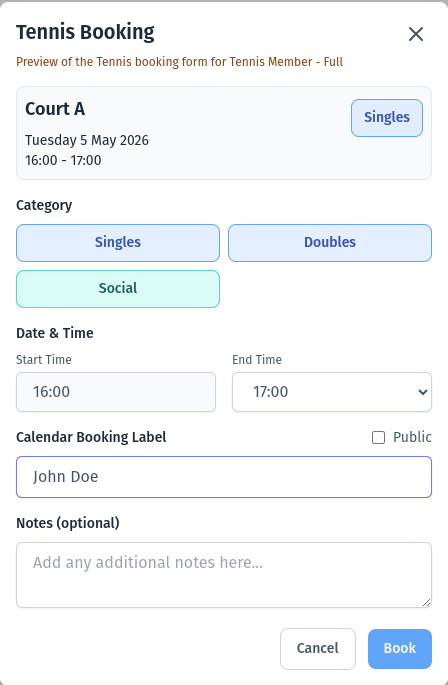
10. Click Book to complete the booking, or you can edit the details first including:
- The Category, you can click on Doubles if you are playing Doubles instead of the default setting Singles
- The End Time, if you wish to book for more than 1 hour
- The Calendar Booking Label, if you want this to be something other than your name
- Notes, if you want to add some additional information for others to see
11. After submitting your booking, you and the Zabesi Administration will receive a booking confirmation email and you will see your booking on the Calendar as well as a booking card at the top showing Your Bookings
You can delete a booking any time before the start time of the booking either by clicking on the Trash Icon in the booking card or clicking on the booking in the calendar
Please contact the Zambesi Administration if you have any questions.